
Pourquoi j'ai écrit mes agents IA à la main, sans CrewAI ni LangGraph
"CrewAI et LangGraph promettent un agent IA fonctionnel en 10 lignes. J'ai préféré tout écrire moi-même — voici pourquoi, et comment ça marche concrètement."
fr
Le piège du “ça marche en 10 lignes”
Il existe aujourd’hui des dizaines de frameworks qui promettent de faire tourner un agent IA presque sans écrire de code : CrewAI, LangGraph, et consorts. Le problème, c’est que ce confort a un prix : le framework décide à ta place comment le modèle réfléchit, comment il appelle des outils, comment il se souvient de la conversation. Le jour où quelque chose casse, tu débogues une boîte noire.
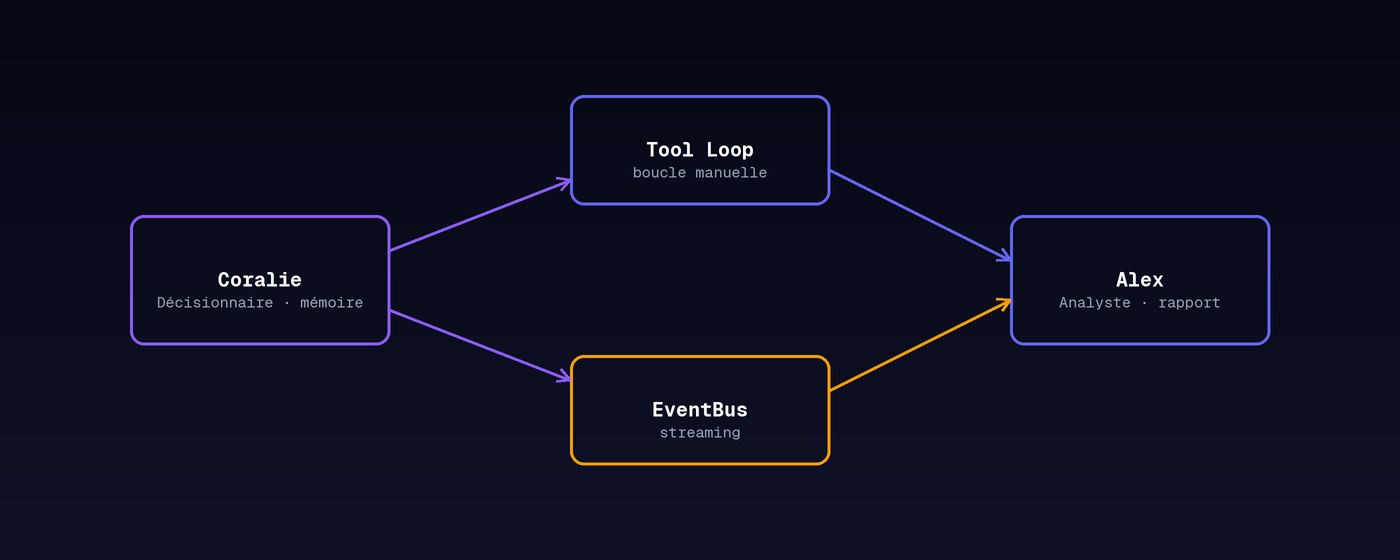
J’ai construit deux agents pour un projet personnel de cybersécurité : Alex, qui analyse du code ou des logs et rédige un rapport, et Coralie, qui discute avec l’utilisateur, se souvient de la conversation, et peut agir sur le système. Plutôt que de les brancher sur un framework, j’ai écrit leur “cerveau” moi-même. Voici ce que ça change concrètement.
Comment un agent “réfléchit” en pratique
Sous le capot, un agent IA qui utilise des outils, c’est juste une boucle qui répète 4 étapes :
1. Le modèle reçoit la question + la liste des outils qu'il peut utiliser
2. S'il répond "j'ai besoin de tel outil", on exécute la fonction correspondante
3. Le résultat de cette fonction est renvoyé au modèle
4. On recommence, jusqu'à ce qu'il donne une réponse finale
Un framework cache ces 4 étapes derrière une seule ligne d’appel. En les écrivant moi-même, j’ai un contrôle total sur chacune — et ça a un avantage concret : quand un bug est apparu (le modèle renvoyait parfois la mauvaise clé pour dire “voici l’outil à utiliser”), j’ai pu le repérer et le corriger en 10 minutes. Avec un framework, cette erreur aurait été noyée dans une exception générique du type “something went wrong”.
Un seul cerveau, plusieurs modèles
Comme je teste plusieurs modèles de langage (certains tournent sur ma machine, d’autres via une API), j’ai construit une petite couche qui uniformise la façon de leur parler : peu importe le modèle branché derrière, le reste du code lui envoie ses questions de la même manière. Ça veut dire que je peux changer de modèle en une ligne de configuration, sans toucher au code des agents — pratique pour comparer objectivement plusieurs modèles sur la même tâche.
Se souvenir, et transmettre le contexte
Coralie doit se souvenir de ce qui a été dit plus tôt dans la conversation ; Alex, lui, produit des rapports ponctuels sans avoir besoin de mémoire. J’ai donc séparé les deux besoins : un historique de conversation d’un côté, une structure de rapport de l’autre. Le lien entre les deux se fait au moment où l’utilisateur clique sur “En savoir plus” sous un rapport d’Alex — Coralie récupère alors ce rapport comme contexte et peut en discuter, comme si elle l’avait lu par-dessus l’épaule d’Alex.
Ce que j’y gagne
Pas de dépendance à un outil externe qui change de version plus vite que je ne peux suivre. Un contrôle total sur chaque étape du raisonnement. Et surtout : quand mon agent prend une décision inattendue, je peux toujours répondre à la question “pourquoi ?” — parce que j’ai écrit chaque ligne du mécanisme qui l’a produite.
en
The trap of “it works in 10 lines”
There are dozens of frameworks today promising to get an AI agent running with almost no code: CrewAI, LangGraph, and the like. The catch is that this convenience comes at a price: the framework decides how the model reasons, how it calls tools, how it remembers the conversation. The day something breaks, you’re debugging a black box.
I built two agents for a personal cybersecurity project: Alex, who analyzes code or logs and writes a report, and Coralie, who talks with the user, remembers the conversation, and can act on the system. Instead of wiring them to a framework, I wrote their “brain” myself. Here’s what that actually changes.
How an agent actually “thinks”
Under the hood, an AI agent that uses tools is just a loop repeating 4 steps:
1. The model receives the question + the list of tools it can use
2. If it replies "I need this tool", the matching function runs
3. That function's result is sent back to the model
4. Repeat until it gives a final answer
A framework hides these 4 steps behind a single function call. By writing them myself, I have full control over each one — which paid off directly: when a bug appeared (the model sometimes returned the wrong key to say “here’s the tool to use”), I could spot it and fix it in 10 minutes. With a framework, that error would have been buried under a generic “something went wrong” exception.
One brain, several models
Since I test several language models (some run on my own machine, others through an API), I built a thin layer that standardizes how they’re addressed: no matter which model is plugged in behind it, the rest of the code talks to it the same way. That means I can switch models with one config change, without touching the agents’ code — handy for comparing models fairly on the same task.
Remembering, and passing context along
Coralie needs to remember what was said earlier in the conversation; Alex produces one-off reports and doesn’t need memory. So I split the two needs: a conversation history on one side, a report structure on the other. The two connect when the user clicks “Learn more” under one of Alex’s reports — Coralie then picks up that report as context and can discuss it, as if she’d read it over Alex’s shoulder.
What I gain from this
No dependency on an external tool changing faster than I can keep up with. Full control over every reasoning step. And above all: when my agent makes an unexpected decision, I can always answer “why?” — because I wrote every line of the mechanism that produced it.